Current Running Version of TillyNet
Current Running Version of TillyNet
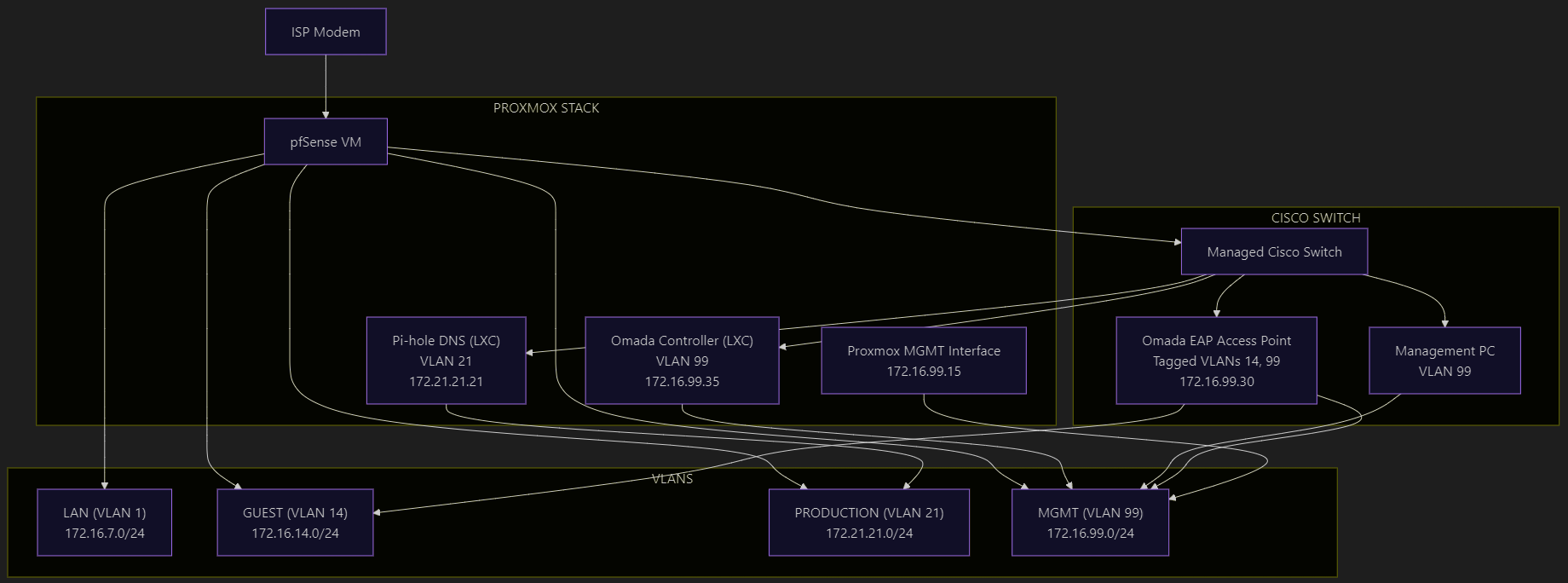
This post is the full technical breakdown of TillyNet v2.0 — my VLAN-segmented, firewall-enforced home lab built on Proxmox and pfSense. If you want to see how I apply enterprise network design principles on real hardware with open-source tools, this is the reference document.
TillyNet is my custom-built home lab environment designed to practice enterprise-grade network segmentation, high availability, and security enforcement using open-source tools. This architecture simulates production-level infrastructure across network engineering, virtualization, firewall administration, and Linux system management.
Network Topology
Network Design Objectives
- Layer 2/3 segmentation using VLANs
- Centralized routing and firewalling with pfSense
- Hypervisor-based infrastructure using Proxmox VE
- Containerized services for DNS and wireless controller management
- Policy-based access control enforced through inter-VLAN firewall rules
- Minimal trust zones with internal DNS filtering and strict pathing
VLAN Overview
| VLAN ID | Purpose | Subnet |
|---|---|---|
| 1 | Default/legacy | 172.16.7.0/24 |
| 14 | Guest Wi-Fi | 172.16.14.0/24 |
| 21 | Production DNS | 172.21.21.0/24 |
| 99 | Management Access | 172.16.99.0/24 |
| 666 | Native Trunk VLAN | N/A |
Each VLAN is routed via a pfSense firewall using a router-on-a-stick model over a single trunk interface connected to a managed Cisco Catalyst switch.
Core Infrastructure
Router/Firewall
- pfSense (virtualized) on a dedicated x86 appliance
- Handles inter-VLAN routing, DHCP, NAT, and firewall policy enforcement
- Configured with strict rules:
- Inter-VLAN traffic is blocked by default
- Each VLAN is only permitted DNS access to a local recursive DNS server
- Admin GUI access is restricted to the management VLAN
Proxmox Virtualization
-
Host: Protectli Vault (fanless x86 appliance)
-
Proxmox VE 8.3 running:
- pfSense VM (firewall/gateway)
- LXC container: Pi-hole DNS (VLAN 21)
- LXC container: Omada Controller (VLAN 99)
-
Network bridges:
vmbr0: Management (backup)vmbr1: Trunked interface to switch (VLANs 14, 21, 99)vmbr1.99: Tagged VLAN interface for host-level management access
Linux Networking (Proxmox)
The Proxmox host is configured using Linux network bridges with VLAN-aware capabilities to support secure, segmented networking for containers and virtual machines. All networking is statically defined in /etc/network/interfaces, offering full control and reproducibility.
This design ensures:
-
VLAN tagging at the hypervisor level
-
Trunk delivery of VLANs to LXCs and pfSense VM
-
Host isolation through a dedicated VLAN interface (
vmbr1.99) -
Compatibility with PCI passthrough NICs for physical routing
Network Interface Layout
| Interface | Role | Type | IP Address | Notes |
|---|---|---|---|---|
enp2s0 | pfSense LAN | PCI passthru | — | Routed to switch for VLAN trunking |
enp3s0 | pfSense WAN | PCI passthru | — | Connected to ISP modem |
enp1s0 | MGMT bridge uplink | Physical | — | Tagged VLAN trunk to Catalyst |
enp4s0 | Backup management | Physical | — | Static untagged link |
vmbr0 | Backup mgmt bridge | Linux bridge | 172.16.7.15/24 | Management fallback IP |
vmbr1 | VLAN trunk bridge | Linux bridge | — | Tagged VLAN trunk to containers |
vmbr1.99 | Host MGMT interface | VLAN subif | 172.16.99.15/24 | Used for Proxmox admin access |
/etc/network/interfaces Configuration
auto lo
iface lo inet loopback

# Backup Management Physical NIC
iface enp4s0 inet manual

# MGMT Trunk NIC
iface enp1s0 inet manual

# PCI Passthrough to pfSense
iface enp2s0 inet manual
iface enp3s0 inet manual

# Backup Management Bridge (Plan to decommission)
auto vmbr0
iface vmbr0 inet static
    address 172.16.7.15/24
    bridge-ports enp4s0
    bridge-stp off
    bridge-fd 0
    bridge-vlan-aware yes
    bridge-vids 2-4094
    dns-nameservers 1.1.1.1 8.8.8.8

# MGMT Trunk Bridge
auto vmbr1
iface vmbr1 inet manual
    bridge-ports enp1s0
    bridge-stp off
    bridge-fd 0
    bridge-vlan-aware yes
    bridge-vids 2-4094

# VLAN 99 Subinterface for Proxmox Host
auto vmbr1.99
iface vmbr1.99 inet static
    address 172.16.99.15/24
    gateway 172.16.99.1
VLAN Usage by Containers
Each LXC container is assigned to the appropriate VLAN through Proxmox's vlan tag setting while still connected to the same vmbr1 bridge. This enables seamless multi-VLAN networking without needing additional physical NICs.
-
Omada Controller:
- Bridge:
vmbr1 - VLAN Tag:
99 - IP:
172.16.99.35/24
- Bridge:
-
Pi-hole DNS:
- Bridge:
vmbr1 - VLAN Tag:
21 - IP:
172.21.21.21/24
- Bridge:
With this configuration, containers receive only the VLAN traffic they are explicitly assigned, and host-level access is limited to a single tagged VLAN interface — a model that mirrors enterprise best practices in virtual networking.
Host-Level VLAN Interface
To maintain separation between the Proxmox host and container traffic, a dedicated subinterface vmbr1.99 is configured for the management VLAN. This allows host-level SSH and web access only from the management network.
auto vmbr1.99
iface vmbr1.99 inet static
    address 172.16.99.15/24
    gateway 172.16.99.1
    vlan-raw-device vmbr1
LXC Automation and Cron Jobs
To maintain the health and performance of containerized services within TillyNet, I implemented lightweight automation using cron inside each LXC. This approach keeps core services updated and resilient without the overhead of full-scale configuration management tools — while still remaining extensible.
Pi-hole (LXC 300)
Automated via root cron job:
# Run Pi-hole gravity update daily at 2:00 AM
0 2 * * * /usr/local/bin/pihole updateGravity > /var/log/pihole_cron.log 2>&1
This ensures the ad-blocking and threat feed lists stay up to date without manual intervention.
Omada Controller (LXC 200)
Automated via cron for regular backups:
# Backup Omada site config every day at 3:00 AM
0 3 * * * /opt/tplink/omada/data/autobackup.sh >> /var/log/omada_backup.log 2>&1
The backup script syncs the controller config and wireless SSID/site layout to a local or external backup target.
System-Wide (Both LXCs)
General update routine:
# Security updates every Sunday at 4:00 AM
0 4 * * 0 apt update && apt -y upgrade >> /var/log/apt_cron.log 2>&1
This ensures both containers remain patched and secured, with logs rotated weekly via logrotate.
Services and Roles
| Service | Location | IP (Subnet) | VLAN | Notes |
|---|---|---|---|---|
| Firewall/Gateway | pfSense VM | Trunked interface | All | Routes all VLANs |
| DNS Filtering | Pi-hole LXC | 172.21.21.21/24 | 21 | Internal DNS for all VLANs |
| WAP Control | Omada Controller | 172.16.99.35/24 | 99 | Manages EAP access points |
| Management GUI | Proxmox Host | 172.16.99.15/24 | 99 | VLAN-tagged virtual interface |
Switching Layer
- Cisco Catalyst 2960-C switch
- Configured with trunk ports for uplinks and Proxmox host
- Native VLAN 666 used to isolate untagged traffic
- Access and trunk ports statically assigned to appropriate VLANs
- STP (PVST) with system-id extension enabled
Wireless Infrastructure
- Access Point: TP-Link Omada EAP series
- Guest Wi-Fi SSID isolated via VLAN 14
- WPA2/WPA3 mixed security
- VLAN tagging applied per SSID to ensure proper segmentation
Security Posture
- DNS Centralization: All VLANs rely on a local Pi-hole for DNS queries
- Access Control: Only specific ports (e.g., DNS, admin access) allowed
- Microsegmentation: Each VLAN is isolated; no lateral movement allowed
- GUI Lockdown: Firewall admin access restricted to trusted VLAN
- Guest Isolation: Guest devices have zero access to internal infrastructure
Learning Outcomes
- Advanced VLAN trunking and switch configuration
- Implementation of router-on-a-stick using pfSense
- Design of containerized services using LXC on Proxmox
- Firewall rule creation and policy-based routing
- Application of zero trust principles in a home network
- Real-world exposure to enterprise wireless configuration
- Linux and open-source toolchain integration
Final Notes
This deployment represents the current live version of TillyNet and serves both as a personal learning platform and a functional demonstration of scalable, secure network design. Each layer is intentionally crafted to mirror best practices seen in production environments across SMB and enterprise infrastructure.
Future plans include using Ansible for automated provisioning of LXC containers and firewall rule templating. This is version 2.0 of TillyNet. Future versions will expand automation, introduce container orchestration, and deploy a backup DNS service.